


Three apps. One booking. Really?
WhatsApp, spreadsheet, Google Calendar. Three steps every time, and it starts over if anything changes.

[ three-apps ]
public/pain-three-apps.png

Lumira Health, built for physios
Lumira handles the admin so you can put your full attention back on the patient in front of you.
You treat patients, handle bookings, write notes, and send invoices all in the same day. Lumira is built around exactly that reality.

public/who-illus-solo.png Registering a patient
Patient records
Billing
No-shows
Everything you need to run your practice, in one place.

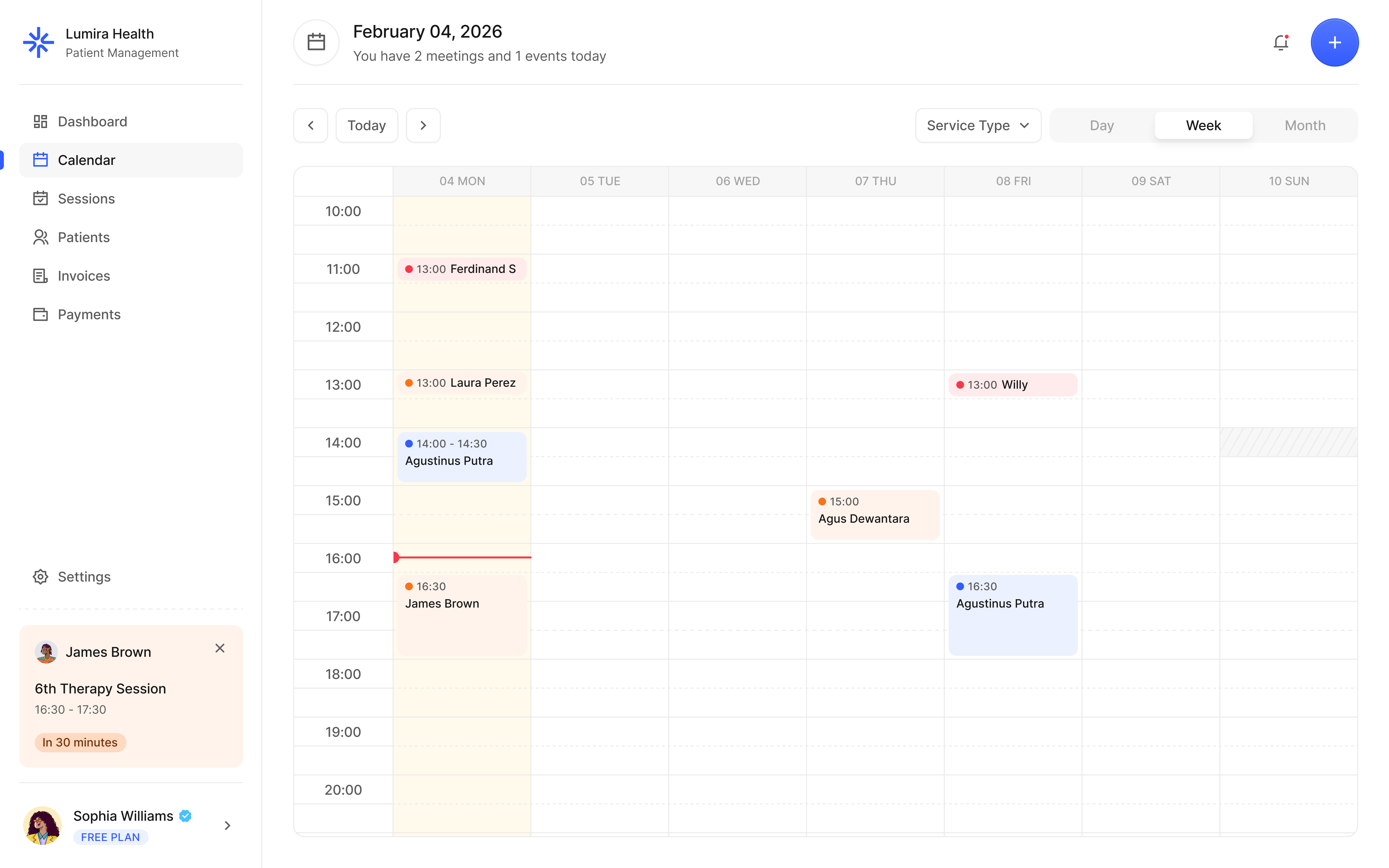
public/showcase-schedule.png 
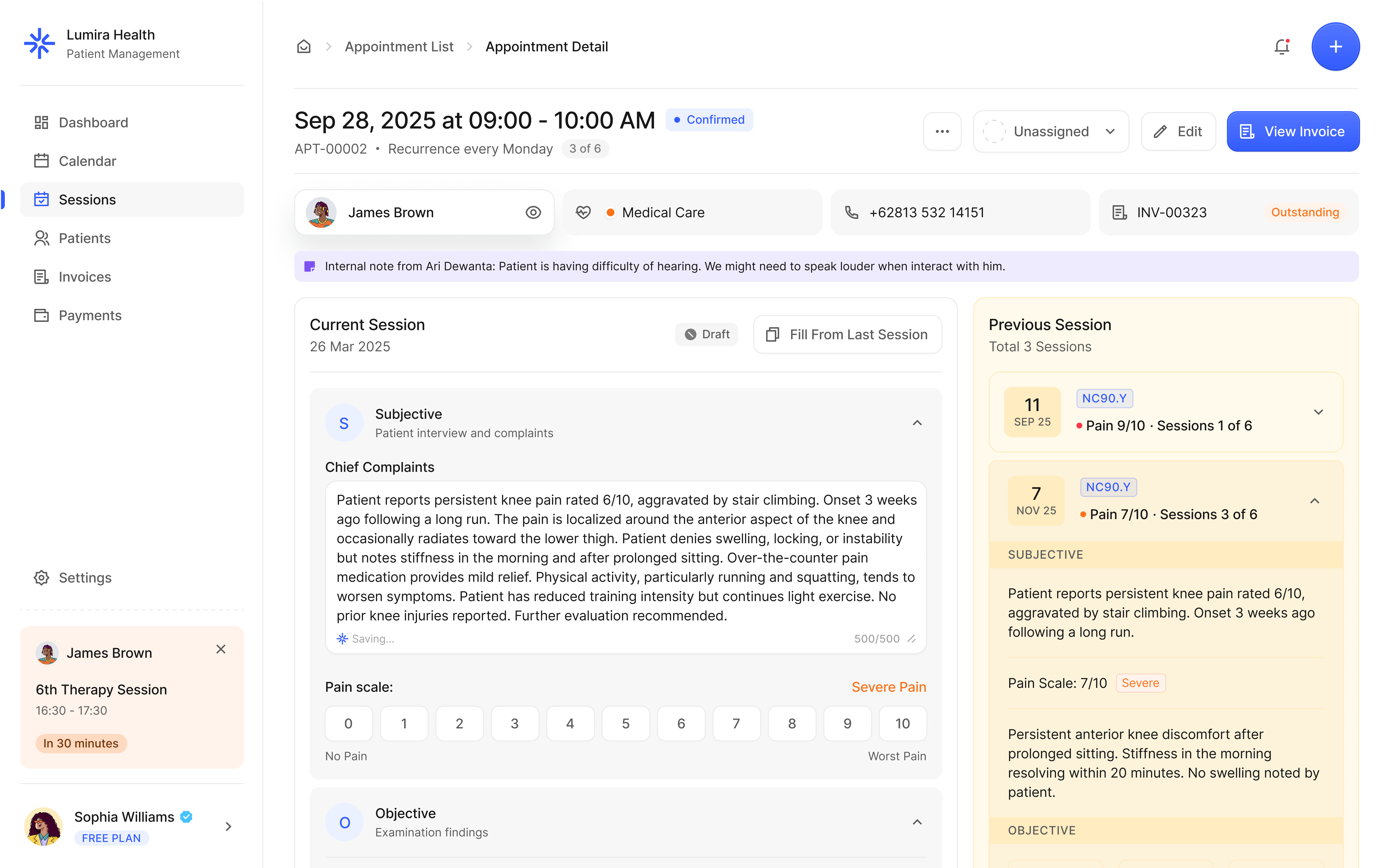
public/showcase-patients.png 
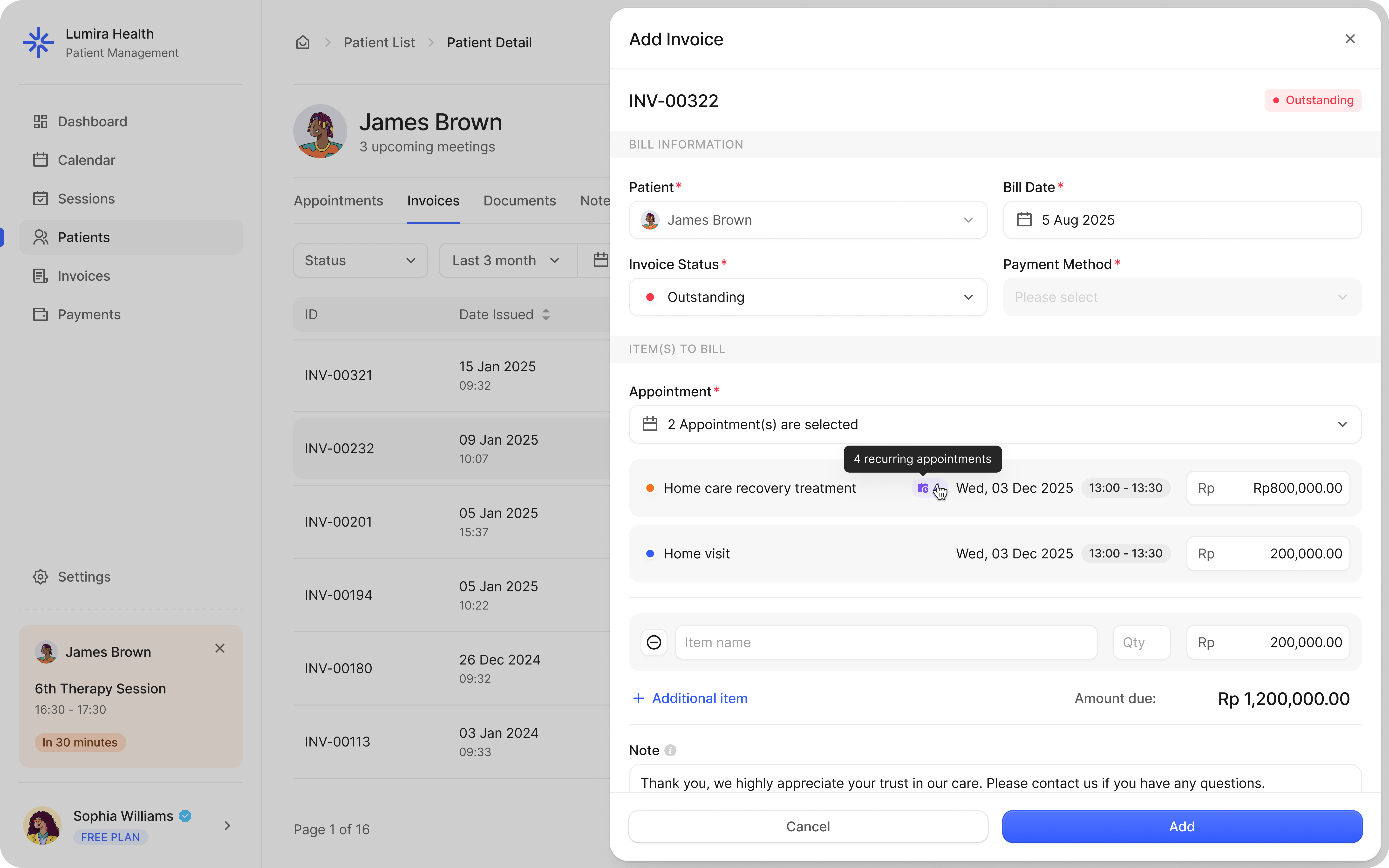
public/showcase-billing.png 35 sessions a week means 35 notes, 35 invoices, 35 reminders. It stacks into a second job.

public/pain-featured.png WhatsApp, spreadsheet, Google Calendar. Three steps every time, and it starts over if anything changes.
Paper notes get lost. Comparing progress means finding the right piece of paper first.

A bank transfer screenshot is not an invoice. When patients need it for insurance, you both get stuck.

Start free today. Upgrade inside the app whenever you need more.
Free
5 patients maximum. No credit card.
Pro
/month · cancel any time
No credit card needed. Start free and upgrade to Pro anytime inside the app.
Here is what they say after switching to Lumira.
[ PLACEHOLDER — strongest testimonial. Should speak to a specific before/after transformation with a concrete number. For example, going from three hours of admin per day to under thirty minutes. ]
Raka Pranata
Solo physio · Denpasar, Bali
Saved on admin every day
Fewer no-shows
[ PLACEHOLDER — quote about invoicing and professional receipts for insurance ]
Dian Kusumawardani
Home visit physio · Jakarta
[ PLACEHOLDER — quote about tracking patient progress across sessions ]
Bagus Setiawan
Sports physio · Surabaya
[ Replace placeholder quotes + metrics with real data before launch ]
If yours is not here, just message us.
About 5 minutes. Create your account, fill in your practice details, and you can start registering patients straight away. No training needed, no lengthy onboarding process.
Not at all. If you can use WhatsApp and Google Calendar, you can use Lumira. It runs in your browser and on your phone with no installation required.
You can register and actively manage 5 patients at a time. Once you hit that limit, you will need to upgrade to Pro to add more. Your existing data stays intact regardless of which plan you are on.
Yes. All data is stored on servers in Indonesia, encrypted, and only accessible to you. We do not share or sell any patient information. Your data is yours.
Yes. Lumira is web-based and works on any smartphone browser. You can fill in SOAP notes, check your schedule, and send invoices directly from your phone between sessions.
After you sign up and start using Lumira, go to the Billing tab inside the app. Upgrading takes one click. All your existing patients, notes, and invoices carry over instantly.
Yes, any time. There is no contract and no cancellation fee. If you cancel, you stay on Pro until the end of your billing period and then move back to Free. Your data never gets deleted.
Absolutely. Lumira works wherever you work. You can manage your schedule, fill in notes, and send invoices from your phone on the road. There is no fixed clinic setup required.
Your data stays in your account and you can export it any time. We do not delete your records just because you are on the Free plan or because you have not logged in for a while.
No. Pro is billed monthly with no minimum commitment. You pay for the month you use it and can stop any time.
Still have a question?
We usually reply within a few hours on WhatsApp.
Let Lumira handle the admin so you can show up fully for every session. Free to start, no credit card needed.
No credit card. Upgrade to Pro anytime inside the app.